How do freelancers and workforce suppliers use Connecting-Expertise?
Connecting-Expertise is an online platform designed to support organizations working with a temporary workforce such as consultants, freelancers, and temporary workers. Through the platform, organizations, workforce suppliers, and freelancers can participate in structured processes related to external workforce management. These processes include reviewing requests, submitting proposals for candidates, managing assignments, entering timesheets, and handling financial documents. For workforce suppliers and freelancers looking for opportunities, the platform provides a structured environment where requests from organizations can be reviewed and where proposals can be submitted in response to those requests. This guide explains how freelancers and workforce suppliers can start using the Connecting-Expertise platform and how they can review requests and submit proposals for opportunities available within the system.
Published on:
March 10, 2026
Author:
Mattias Van Nimmen
How do freelancers and workforce suppliers use Connecting-Expertise?
Freelancers and workforce suppliers use the Connecting-Expertise platform to review project requests, submit candidate proposals, and participate in assignments managed by organizations using the platform.
The typical process includes:
Registering for a platform account
Signing in and accessing the platform modules
Reviewing requests in the Requests & Proposals section
Creating and submitting proposals for candidates
Uploading supporting documents and confirming skills
Publishing the proposal for review
This workflow allows suppliers and freelancers to respond to opportunities managed through the Connecting-Expertise platform.
Understanding the Connecting-Expertise Platform
Connecting-Expertise is an independent, real-time online platform that supports organizations in managing temporary workforce activities. Temporary workforce management often involves multiple processes and stakeholders. Organizations may publish requests for external expertise, suppliers may represent consultants or candidates, and freelancers may participate in assignments through these suppliers. The platform supports several of these processes by providing structured modules that help organize the interaction between organizations and suppliers.
Within the platform environment, users may work with activities such as:
Reviewing project requests
Submitting candidate proposals
Managing assignments
Entering timesheets
Accessing financial documentation
For suppliers and freelancers, the platform serves as a place where requests from organizations can be reviewed and where proposals can be submitted for potential assignments.
Connecting-Expertise supports collaboration between organizations and external professionals through a structured platform workflow. Users can review project requests, submit candidate proposals, and manage related activities within the platform.
Who This Guide Is For
This guide is intended for several types of users who interact with the Connecting-Expertise platform.
Workforce suppliers
Workforce suppliers are organizations that represent consultants, specialists, or other external professionals. Suppliers may review requests from organizations and submit candidate proposals for those requests.
Freelancers
Freelancers are independent professionals who may participate in opportunities through suppliers or organizations that submit proposals through the platform.
Registering on the Connecting-Expertise Platform
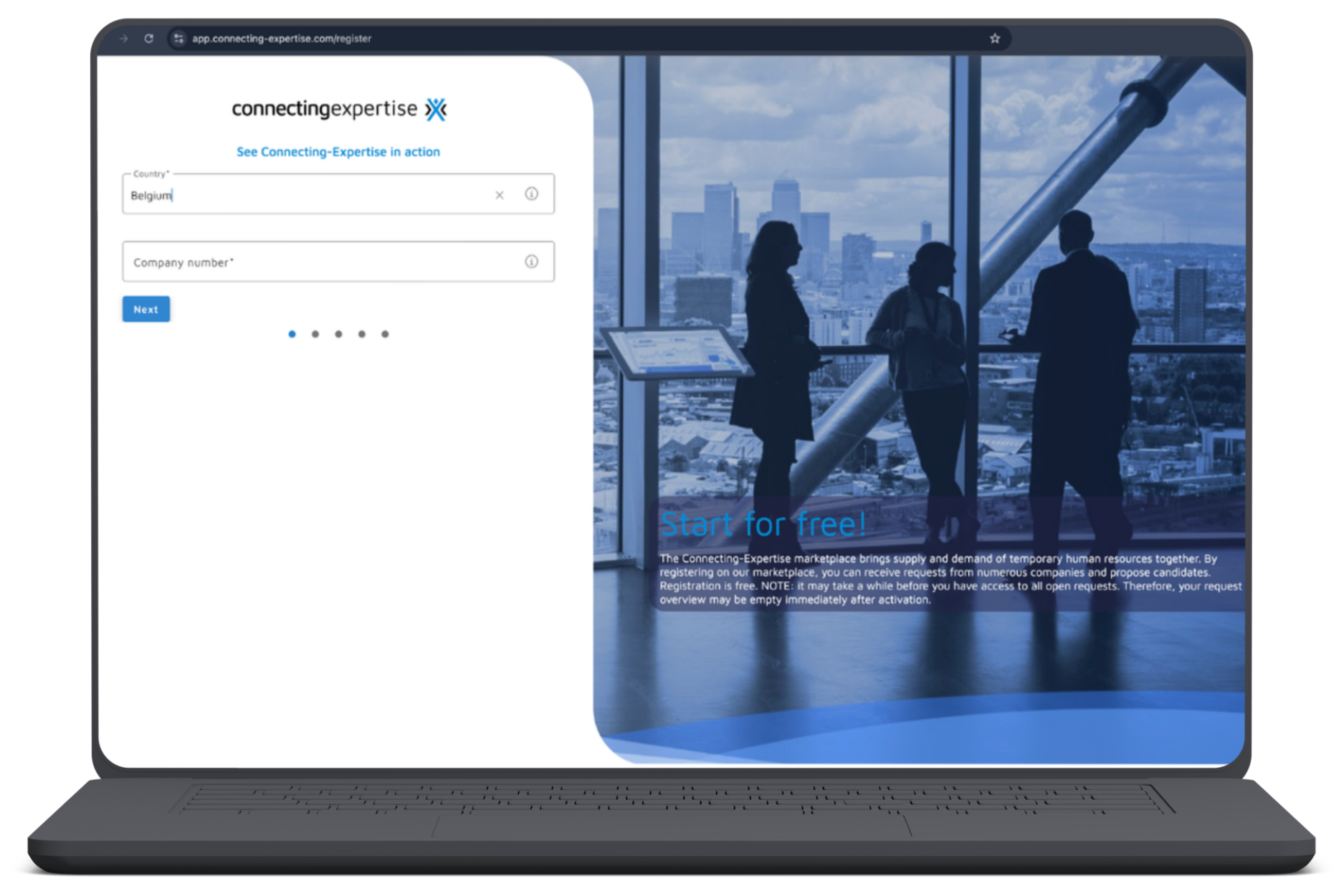
The first step for suppliers or freelancers who want to use the platform is registering for an account. Registration is typically initiated through the Connecting-Expertise website by selecting the Register option.
During registration, users will be asked to provide basic information required to create an account. Examples of information requested during the registration process include:
Country
Company number
After entering the requested information, users proceed through the remaining registration steps until the account creation process is completed. Once the registration process is finished, users can sign in to access the platform.
Signing In and Accessing the Platform
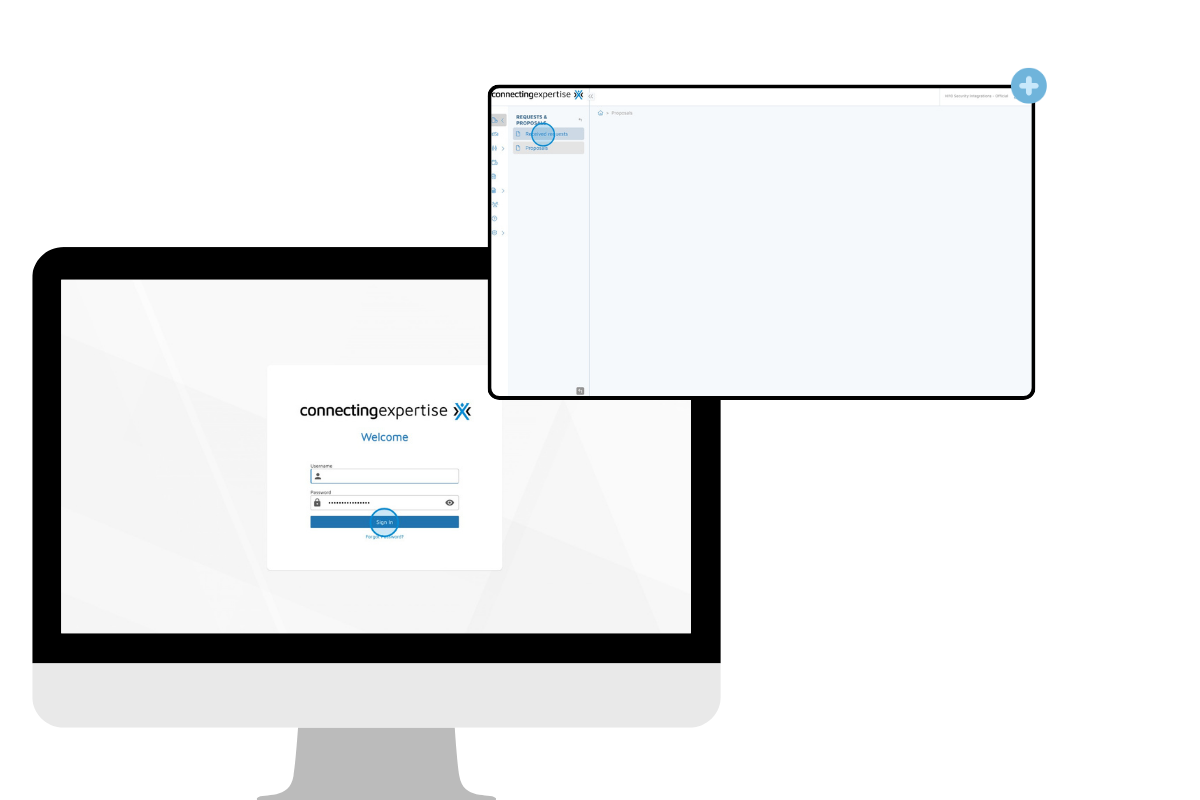
After creating an account, users can access the platform by signing in. Signing in provides access to the platform dashboard and the different modules available within the system. From there, suppliers and freelancers can begin reviewing requests and navigating the platform environment. Access to different areas of the platform may depend on the permissions assigned to the user within the organization. Once signed in, users can navigate the platform using the main interface and sidebar navigation.
Understanding the Main Platform Modules
The Connecting-Expertise platform organizes its processes into several core modules. These modules support the workflow between organizations that publish requests and suppliers that submit candidate proposals.
The four main modules available within the platform include the following.
Requests
The Requests module allows suppliers to review project requests published through the platform. Requests typically contain information about the opportunity, such as descriptions and requirements.
Assignments
The Assignments module supports the management of ongoing engagements once a proposal has been accepted.
Timesheets
The Timesheets module allows users to enter work hours related to assignments.
Financial Documents
The Financial Documents module provides access to documentation related to financial processes associated with assignments. Together, these modules support different stages of the collaboration between organizations and suppliers working with temporary workforce resources.
Navigating the Platform Interface
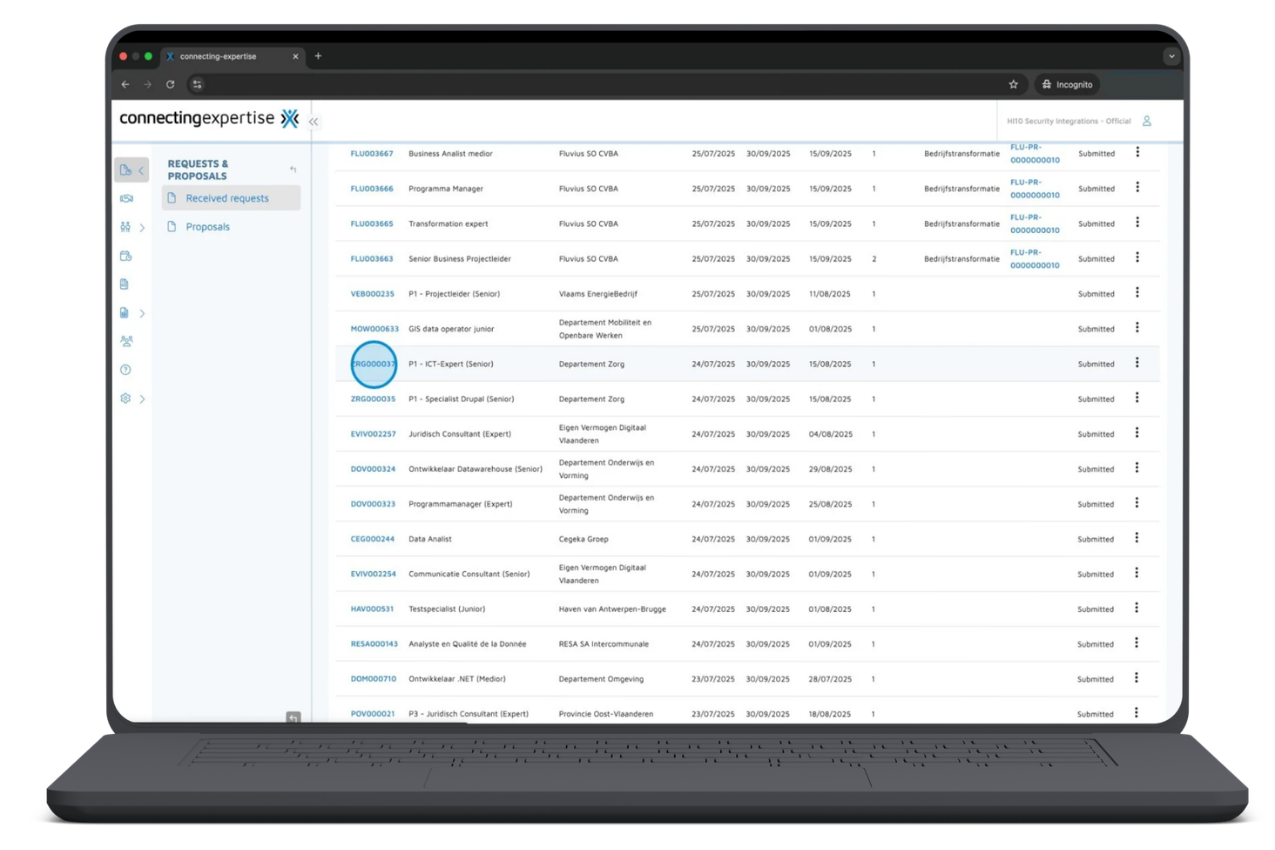
Once signed in, users interact with the platform through the main interface. The platform includes a sidebar navigation that provides access to several sections. These sections allow users to move between operational areas of the platform.
Examples of sections available through the sidebar include:
Requests & Proposals
Assignments
Human Resources
Timesheets
Financial Documents
Reports
Settings
The sidebar allows users to navigate between requests, candidate proposals, assignments, and administrative settings within the platform. Understanding how to navigate these sections helps suppliers and freelancers move efficiently through the platform while reviewing opportunities or submitting proposals.
Reviewing Available Requests
One of the main activities for workforce suppliers and freelancers on the platform is reviewing available requests. Requests can be accessed through the Requests & Proposals section.
To review available requests, users typically follow these steps:
Navigate to the Requests & Proposals section.
Open Received requests.
Browse the list of available requests.
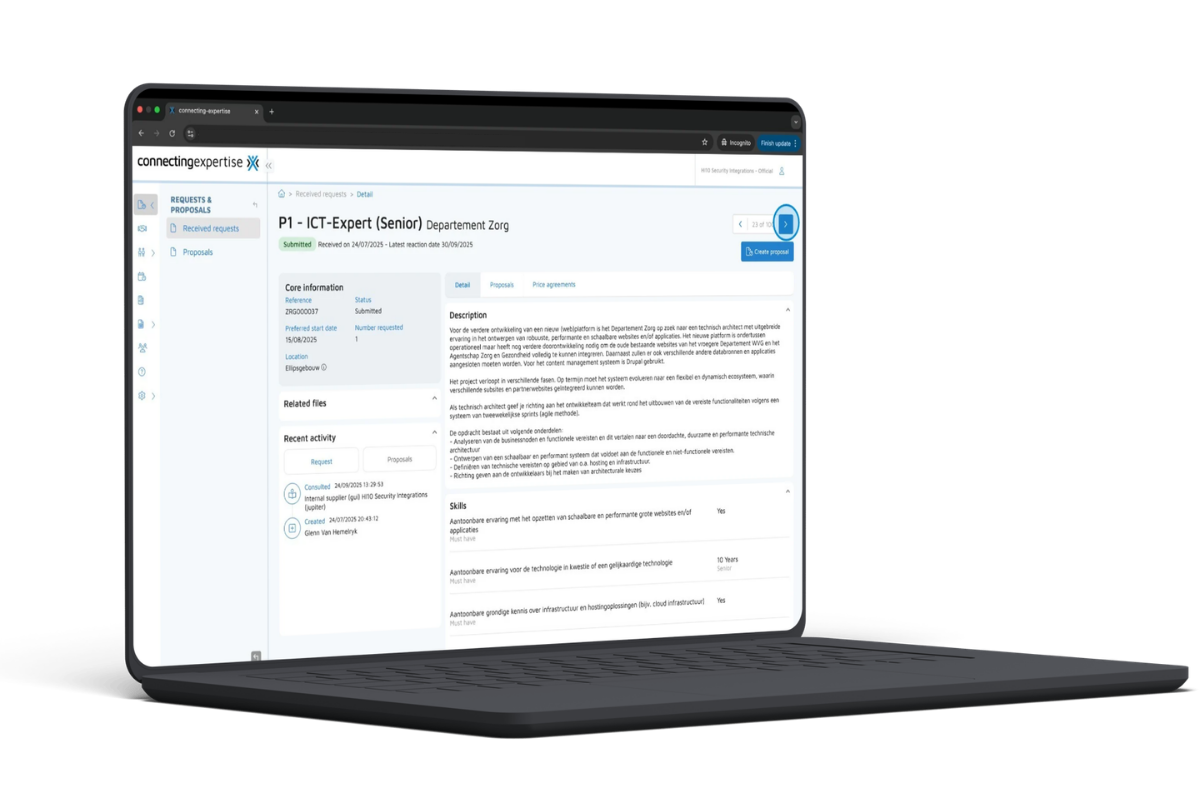
Select a request to view additional details.
Each request represents an opportunity published through the platform. The request page contains information that helps suppliers understand the requirements before submitting a proposal Users can browse multiple requests using the available navigation controls within the request list.
Understanding Request Details
When opening a request, additional information about the opportunity becomes available. Several sections may be available within the request view. These sections help suppliers understand the request and manage proposals related to it.
Details
The details section displays information about the request itself. This may include descriptions, requirements, or other project information.
Proposals
The proposals section allows users to view candidate submissions associated with the request.
Price Agreements
The price agreements section displays financial terms related to proposals submitted for the request.
Insights
The insights section provides analytics related to the request and the response from the market. Reviewing these sections allows suppliers to understand the context of the request before deciding whether to submit a proposal.
Criteria
Connecting-Expertise
SAP Fieldglass
Nétive VMS
ProUnity
Primary market
Belgium / EU
Global
Benelux / Europe
Belgium / Benelux
Founded
2007
1999
2003
2015
Platform type
VMS + Marketplace
VMS + Marketplace (2023)
VMS + ATS + FMS
VMS + Marketplace + MSP
Marketplace
Integrated supplier and freelancer marketplace, native to platform
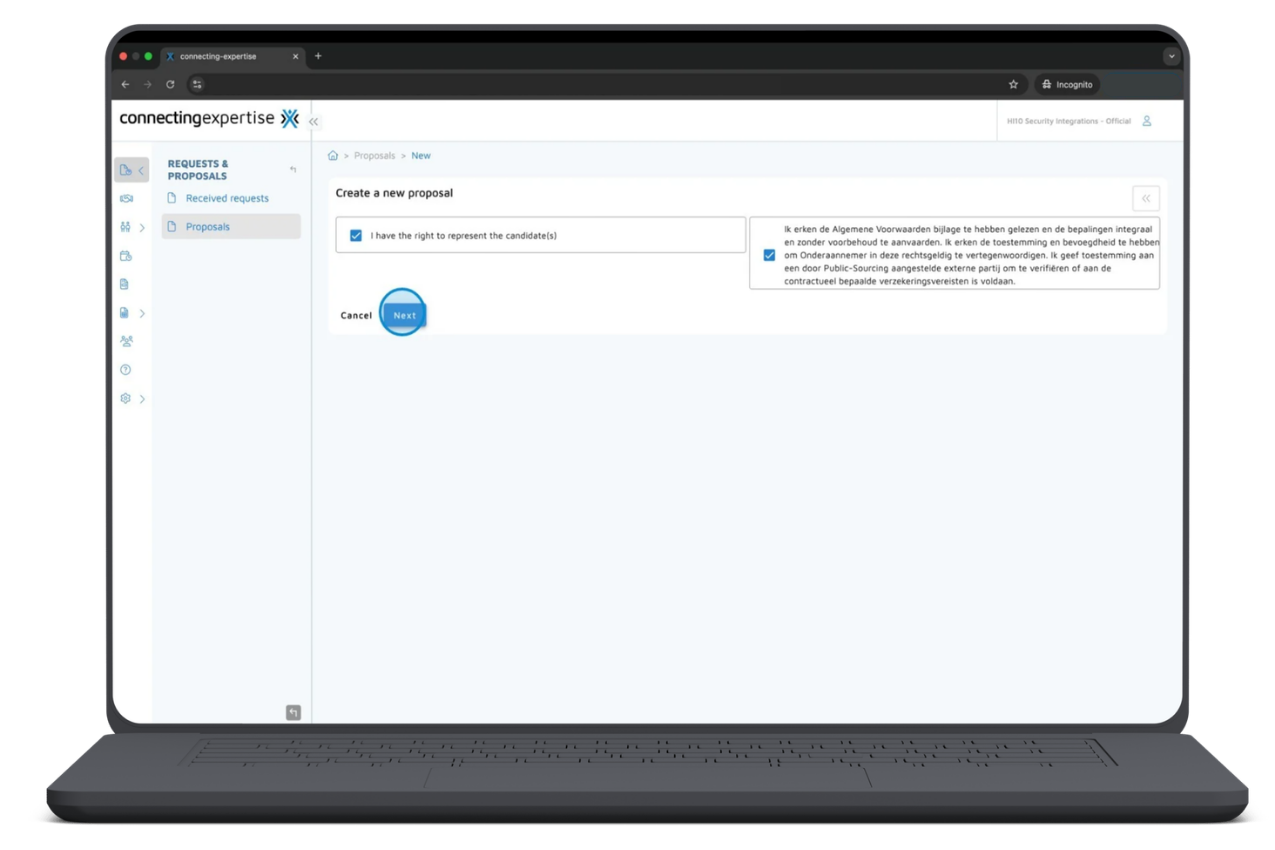
Once a supplier decides to respond to a request, the proposal creation process can begin.
Before continuing with the proposal process, users must confirm certain declarations.
These declarations may include:
Confirming representation rights
Accepting applicable terms and conditions
After confirming these declarations, users can proceed with creating the proposal.
Selecting the Candidate or Human Resource
During the proposal process, the supplier must select the human resource associated with the proposal. The human resource represents the candidate who will be proposed for the request. The candidate can be selected from the available options within the proposal interface. This step ensures that the correct person is associated with the proposal.
Entering Proposal Details
After selecting the human resource, suppliers must provide details related to the proposal. Two examples of proposal information that may be required include availability and proposed rate.
Candidate Availability
Users can select the planned start date for the candidate using the calendar field.
Proposed Rate
The proposed rate for the opportunity is entered within the proposal form. After entering this information, the proposal can be saved to ensure the details are stored in the system. Saving the proposal ensures that the entered information is not lost before completing the remaining steps.
Providing Client-Specific Information
Some proposal fields may depend on the configuration used by the client within the platform. Because different organizations may configure the platform differently, some information required during the proposal process may vary. Users complete the required fields based on the request and save the information to continue the proposal process.
Uploading Supporting Documents
During the proposal process, suppliers can upload documents related to the candidate or proposal.
Examples of documents that may be uploaded include:
Candidate CVs
Supporting documents related to the candidate
Uploading supporting documents helps ensure that the proposal includes relevant information about the candidate. Once a document is uploaded, the information can be saved to ensure it is included as part of the proposal.
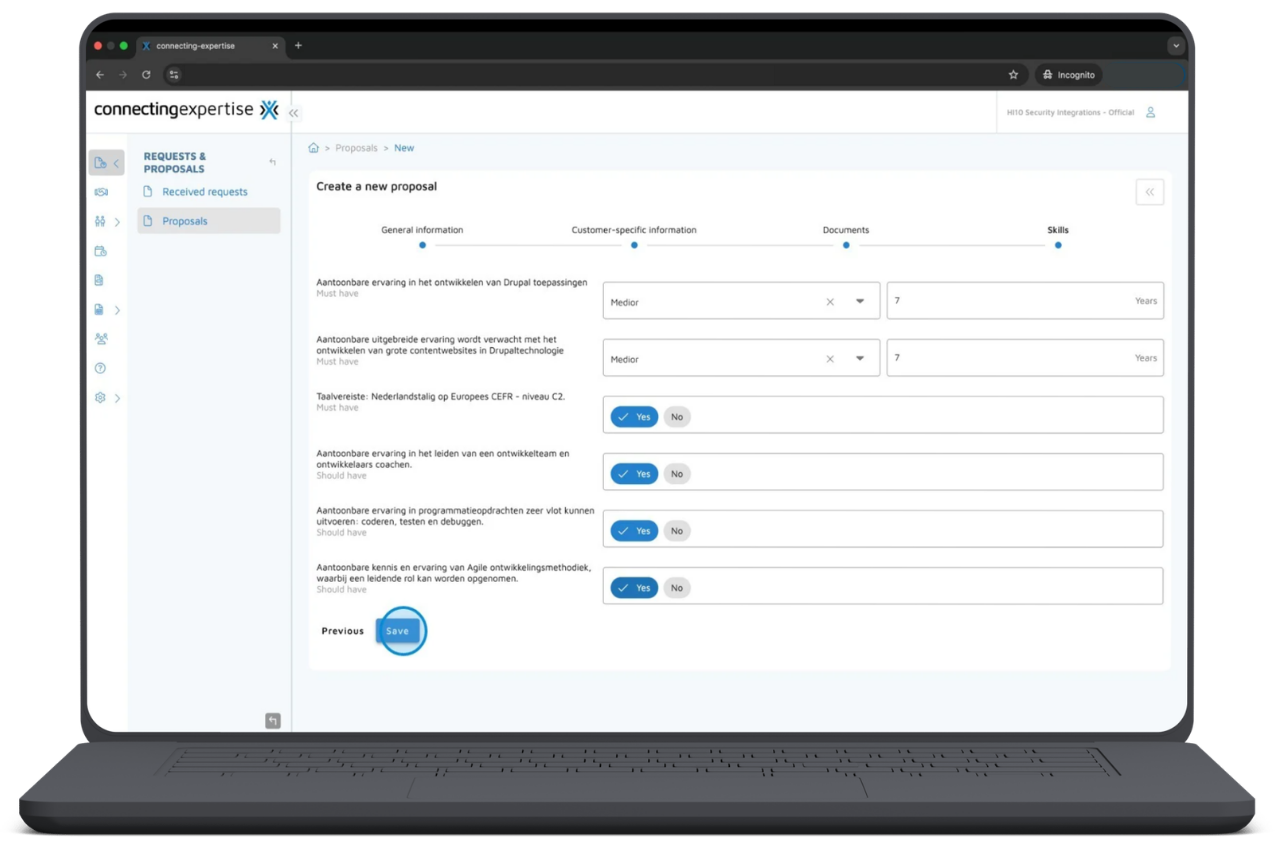
Confirming Candidate Skills
Another step in the proposal process may involve confirming the candidate’s expertise.
This step may include providing information such as:
Skill level
Years of relevant experience
Specific skills associated with the candidate
After confirming the candidate’s skills, the information can be saved as part of the proposal. Providing this information helps ensure that the proposal accurately reflects the candidate’s expertise.
Publishing the Proposal
Once all required information has been entered, the proposal can be finalized and submitted. To publish the proposal, users review the proposal details and select Publish. After the proposal is published, it becomes available for review within the platform. Submitting the proposal completes the process of responding to the request.
Managing Notifications and User Roles
Depending on the permissions assigned to the user, certain settings within the platform may also be managed.
Notification Preferences
Users can configure email notifications related to requests and proposals. Notification settings can be accessed through the profile menu and adjusted according to user preferences.
Roles and Permissions
Organizations using the platform may define roles and permissions for different users. These roles help determine which sections of the platform a user can access and which actions they are allowed to perform.
Frequently Asked Questions
What is the Connecting-Expertise platform used for?
The Connecting-Expertise platform supports organizations working with temporary workforce resources. It helps manage activities such as reviewing requests, submitting proposals, managing assignments, entering timesheets, and accessing financial documents.
Who can submit proposals on the platform?
Workforce suppliers and organizations representing candidates can submit proposals in response to project requests published on the platform.
Where can users find project requests?
Project requests can be reviewed in the Requests & Proposals section of the platform after signing in.
Can freelancers participate in the platform?
Freelancers may participate through suppliers or organizations submitting proposals for project requests.
Workflow Summary: How Suppliers and Freelancers Use Connecting-Expertise
For suppliers and freelancers, the typical workflow on the Connecting-Expertise platform follows a structured sequence.
The process generally includes the following steps:
Registering on the platform
Signing in to access the system
Navigating the platform modules
Reviewing available requests
Creating a proposal
Entering proposal information
Uploading supporting documents
Confirming candidate expertise
Publishing the proposal
Following this process allows suppliers and freelancers to review opportunities and submit candidate proposals within the platform environment.
By clicking “Accept”, you agree to the storing of cookies on your device to enhance site navigation, analyze site usage, and assist in our marketing efforts. View our Privacy Policy for more information.

.png)